
Connect CC Switch (Multi-Provider Configuration Manager)
Overview
CC Switch is a configuration manager for AI coding tools such as Claude Code, Codex, and Gemini. It lets you add multiple providers (official or third-party relays) in a single UI, and optionally enable "usage query" on each provider card to show remaining credits at the bottom.
Wuliang AI Platform exposes an OpenAI-compatible API plus a dedicated balance query endpoint /v1/balance, ready to plug into CC Switch:
- Basic config: add Wuliang as a provider by filling in the API Key and Base URL.
- Usage query: enable "custom usage query" and the card footer will show your account balance, or the daily/monthly budget left on this API Key.
Prerequisites
- CC Switch installed.
- An API Key created on the Wuliang console (create one).
- (Optional) Your account has been topped up, or this API Key has a daily/monthly budget configured.
Basic Configuration
- Open CC Switch and switch to your target tool tab at the top (Claude / Codex / Gemini).
- Click "Add custom configuration".
- Fill in the fields below and save:
| Field | Value |
|---|---|
| Provider name | Any name, e.g. Wuliang |
| API Key | The sk-… you created on the Wuliang console |
| API request URL | https://open.dieyuyun.com |
After saving, CC Switch will forward the corresponding AI tool's requests to the Wuliang platform.
Optional: Show Balance / Budget
CC Switch can show remaining credits at the bottom of each provider card. Wuliang exposes a dedicated balance endpoint — just paste the "custom usage query configuration" below.
Steps
- On the provider card, enable the "Usage query" switch.
- Usage API Key: fill in the same Wuliang API Key (
sk-…) as above. - Query method: choose "Custom".
- Paste the following snippet in full:
;({
  request: {
    url: '{{baseUrl}}/v1/balance',
    method: 'GET',
    headers: { Authorization: 'Bearer {{apiKey}}' },
  },
  extractor: function (response) {
    // 1) Error handling: show an invalid state when the key is bad or the API fails
    if (response && response.error) {
      return {
        isValid: false,
        invalidMessage: response.error.message || 'API call failed',
      }
    }
    if (!response || typeof response.balance !== 'number') {
      return { isValid: false, invalidMessage: 'Unexpected response' }
    }

    // 2) Base fields
    var unit = response.currency || 'CNY'
    var key = response.api_key || {}
    var balance = response.balance

    // 3) Prefer daily budget; fall back to monthly; fall back to account balance
    if (key.daily_budget != null && key.daily_remaining != null) {
      var extraParts = []
      if (key.daily_reset_at) extraParts.push('reset: ' + key.daily_reset_at)
      if (key.monthly_budget != null) {
        extraParts.push('monthly: ' + key.monthly_remaining + '/' + key.monthly_budget)
      }
      return {
        isValid: true,
        remaining: key.daily_remaining,
        total: key.daily_budget,
        used: key.daily_used,
        unit: unit,
        planName: 'Wuliang · ' + (key.name || 'daily'),
        extra: extraParts.join(' · ') || undefined,
      }
    }

    if (key.monthly_budget != null && key.monthly_remaining != null) {
      return {
        isValid: true,
        remaining: key.monthly_remaining,
        total: key.monthly_budget,
        used: key.monthly_used,
        unit: unit,
        planName: 'Wuliang · ' + (key.name || 'monthly'),
        extra: key.monthly_reset_at ? 'reset: ' + key.monthly_reset_at : undefined,
      }
    }

    // 4) No budget set: show the total available balance
    return {
      isValid: true,
      remaining: balance,
      unit: unit,
      planName: 'Wuliang · pay-as-you-go',
      extra: 'Key: ' + (key.name || '-'),
    }
  },
})
Save and click "Refresh" — the card footer will show the balance / budget, and turn red with an error message when the Key is invalid.
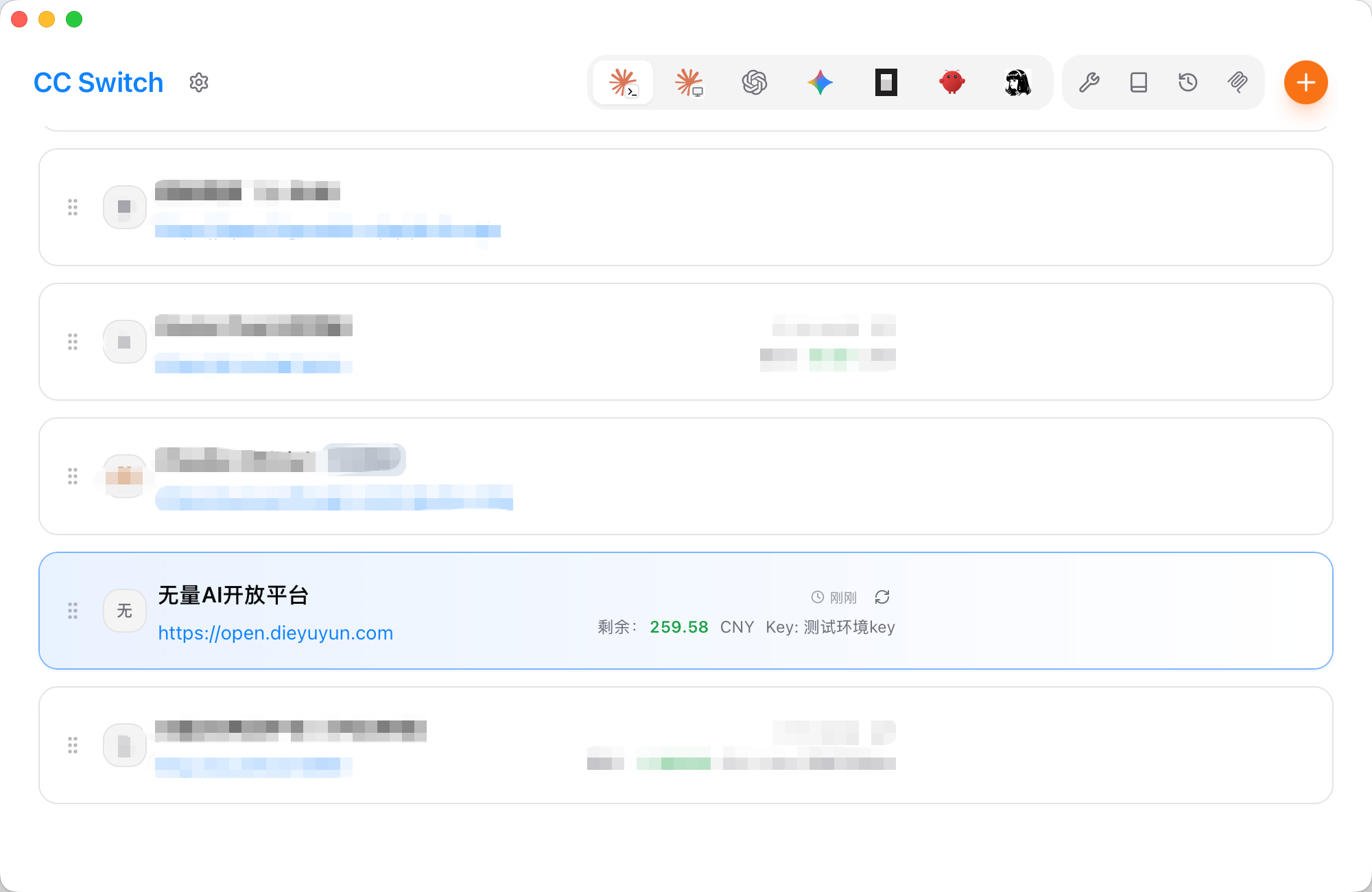
Screenshot pending: replace with a real capture before launch. Drop a PNG at
apps/site/src/public/images/guide/dev/cc-switch-balance-success.pngand change the.svgextension above to.png. Expected — card footer shows1198.1 CNY, plan nameWuliang · pay-as-you-go, extra fieldKey: 测试环境key.
Tip:
{{apiKey}}and{{baseUrl}}are auto-substituted by CC Switch with the values you filled in on the card. If you created several provider cards that share the same Key, they will all show the same balance.
Response Fields
The balance endpoint returns the following JSON:
{
  "object": "balance",
  "currency": "CNY",
  "balance": 138.5,
  "api_key": {
    "id": "1923456789012345678",
    "name": "claude-code",
    "daily_budget": 20.0,
    "daily_used": 3.25,
    "daily_remaining": 16.75,
    "daily_reset_at": "2026-06-09T00:00:00+08:00",
    "monthly_budget": null,
    "monthly_used": null,
    "monthly_remaining": null,
    "monthly_reset_at": null
  }
}| Field | Description |
|---|---|
currency | Fixed CNY. |
balance | Total available (yuan) = top-up balance + gift balance. |
api_key.id / api_key.name | ID and name of the current API Key. |
api_key.daily_budget | Daily budget (yuan), null if not set. |
api_key.daily_used | Consumed today (yuan). |
api_key.daily_remaining | Remaining daily budget (yuan), max(0, daily_budget - daily_used). |
api_key.daily_reset_at | Next daily budget reset time (ISO8601, local timezone). |
api_key.monthly_budget / monthly_used / monthly_remaining / monthly_reset_at | Monthly budget equivalents. |
CC Switch extractor standard fields (all optional):
| extractor return field | Description |
|---|---|
isValid | Boolean, whether the plan is valid; false turns the card into an invalid state. |
invalidMessage | String, reason shown when isValid=false. |
remaining | Numeric, the main remaining value shown on the card (recommended). |
unit | Currency unit. Wuliang always returns CNY. |
planName | Plan label, e.g. Wuliang · claude-code. |
total | Numeric, total quota — used for a progress bar. |
used | Numeric, consumed amount. |
extra | String, free-form text — handy for "reset time" or "monthly remaining". |
FAQ
Card footer keeps showing 0.00 USD (or the template default)
That's the return value of CC Switch's default extractor template ({ remaining: 0, unit: "USD" }), which means our extractor isn't actually running. Common causes:
- Only the
requestblock was replaced, not theextractorfunction body: replace the whole snippet from({to})at once. Theextractorfunction must not be justreturn { remaining: 0, unit: "USD" }. - The custom config wasn't saved: after pasting, click "Save", then click the refresh button on the card top-right.
- The "API request URL" field is empty:
{{baseUrl}}is taken from that field — leaving it empty turns the URL into/v1/balance(no host) and the request fails silently.
Debug steps:
Open CC Switch's log panel (DevTools / output pane).
Add a log line at the top of the extractor function:
jsextractor: function(response) { console.log("[wuliang]", JSON.stringify(response)); // ... keep the rest unchanged }Save + refresh and look at the log:
Log content Meaning {"object":"balance",…,"balance":1198.1,…}API works; issue is in the rest of the extractor. {"error":{"message":"…","code":"invalid_api_key"}}Key auth failed — check Key state on the console. undefined/null/ no logRequest never went out; {{baseUrl}}is most likely empty.
Card footer shows 0 or N/A (unit is CNY)
- Make sure the API Key is in active state (not disabled / soft-deleted).
- Make sure the Key was copied in full (
sk-prefix + 32 chars). - Click the refresh button on the card top-right to trigger a usage query.
- If your account balance is 0 and the Key has no budget set,
remainingwill be 0, which is expected.
invalid_api_key or 401 error
- The Key may be disabled or expired — check its state on the console Manage API Keys.
- Make sure you didn't miss any characters when copying the Key.
Why does the balance match the console?
balance is the sum of top-up balance and gift balance — the same "available total" shown in the console. On the console Finance overview you can drill into top-ups, gifts, and total consumption separately.
Tracking multiple Keys separately
The Wuliang API only returns budget info for the Key that made the request. To track each Key:
- Copy each full
sk-…from the console. - In CC Switch, create one provider card per Key (name them e.g.
Wuliang-ProjectA/Wuliang-ProjectB). - Each card footer will show the budget / balance of its own Key.
Why does the extractor prefer daily budget?
If your Key has a daily budget (e.g. ¥20/day), showing "today's remaining" on the card is more meaningful; if not, it falls back to the total available balance. You can always simplify the extractor to always show the account balance:
extractor: function(response) {
  return { remaining: response.balance, unit: response.currency || "CNY" };
}